

Referral partner
Share your partner code and earn commission, and take counsel matters routed to you as a Cross-Border Corridor Brief.
A referral partner earns from BlockWill without doing estate-planning work for a client list. The flow covers two things, and an account gets both together:
| Part | Where in the portal |
|---|---|
| Partner-code referrals | Earnings → Referrals tab |
| Counsel network handoffs | Counsel network → Referral Handoffs |
Neither appears until BlockWill enables the Referrals flow on your account.
Partner-code referrals
People sign up to BlockWill with your partner code, and you earn commission on what they pay.
Your partner code
Every partner account has one code in the format BW-XXXXXX, for example BW-4KQ7ZM. It
never changes and it is how every referral is attributed back to you.
You will find it in three places:
- Top-right of the portal header. Click it to copy.
- Profile page, under your business details.
- The approval email BlockWill sent when your account went live.
The code is the whole mechanism. There is no separate referral link to generate and no per-campaign code. Share the one code.
How someone becomes your referral
You give a prospect your partner code.
They sign up to BlockWill and reach onboarding. One of the onboarding fields is the partner code.
They type your code. It is validated live as they type, so a wrong or unknown code is rejected there and then rather than silently lost.
They finish onboarding. The referral is recorded against your partner account and shows up in Earnings with the status Waiting.
The code has to be entered by the client. If they complete onboarding without it, the referral is not yours. A client who missed it can still add a partner code later from their own Settings, but only while they have no code set. It cannot be changed once one is attached.
The Referrals tab
Earnings → Referrals lists everyone who signed up with your code, and what each one earned you.
Columns: Referred User, Joined, Signed Up, Plan, Commission, and Status. Once you have more than five referrals a status filter appears above the table (Show all, Waiting, Approved, Paid, Voided).
Commission status
| Status | Meaning |
|---|---|
| Waiting | Recorded, but the refund window has not passed yet. Nothing is owed to you. |
| Approved | Cleared and credited to your commission ledger. It counts toward your next payout. |
| Paid | Included in a payout that has been paid out to you. |
| Voided | Cancelled. A refund, a dispute, or a referral that did not stay valid. |
Your commission rate and currency are set by BlockWill on your partner account. You do not set them in the portal.
From signup to money in your account
This is the part partners most often ask about. A referral does not become cash immediately.
Signup. The referral is recorded as Waiting the moment onboarding completes with your code.
45-day refund window. Commission is held while the payment can still be refunded or disputed. A daily job checks which holds have matured.
Credit. Once the window passes and the payment, the referral, and your partner account all still check out, the commission is credited to your ledger and the referral turns Approved. A commission that fails any of those checks is Voided instead.
Payout buffer. Credited amounts become available for payout after your account's buffer period.
Monthly payout run. On the 5th of each month BlockWill totals your available credits minus any debits (refunds, adjustments) and raises a payout for the period. It starts at Pending Approval.
Paid. After BlockWill approves and pays it, the payout shows as Paid in the Payouts tab and the referrals it covered turn Paid.
Add your bank account under Settings before your first payout. Payouts have nowhere to land without it.
Recurring commission
A referral is not always a single one-off payment. Where a referred client is on a recurring plan, commission accrues per paid month rather than once at signup, and each month goes through the same hold-then-credit path above. The Commission column shows what that referral has earned you in total so far.
Your commission also shows up in the Earnings hero and the Payouts tab. See Account.
Counsel network handoffs
As counsel you do not take clients from a list. The BlockWill analysis engine routes a matter to you when a client's file raises something in your practice area, and it arrives as a Cross-Border Corridor Brief: findings, rule identifiers, and jurisdictions. No vault contents.
Everything lives under Counsel network → Referral Handoffs in the sidebar.
The brief is a findings package, not the client's file. Vault data reaches you only if the owner grants a release on that specific handoff, and they can revoke it at any time.
Counsel profile
Routing is driven entirely by this profile. Set it before anything can reach you.
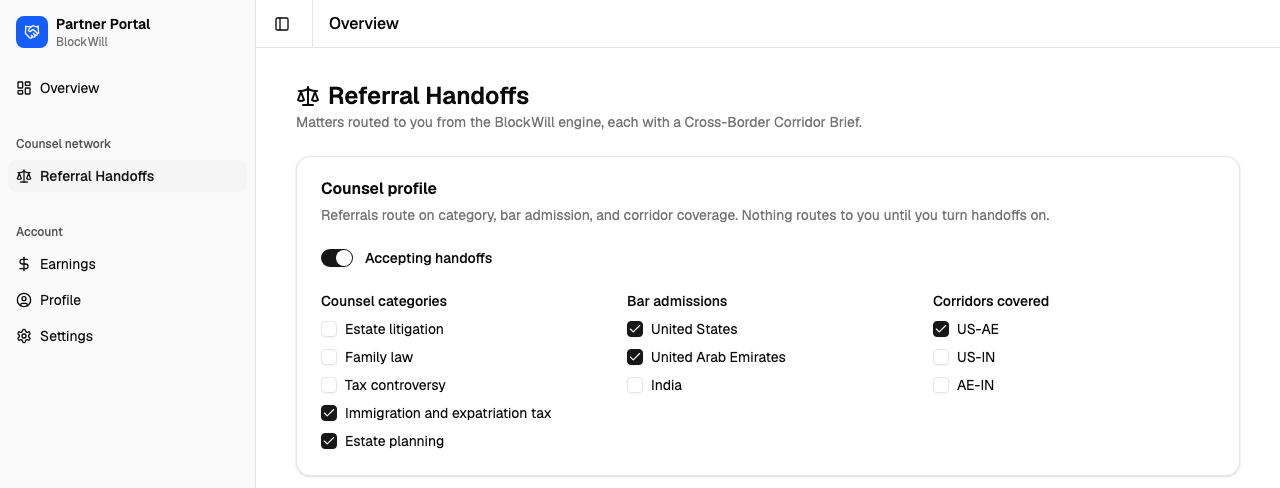
| Field | What it does |
|---|---|
| Accepting handoffs | The master switch. While it is off, the engine skips you entirely. |
| Counsel categories | Estate litigation, Family law, Tax controversy, Immigration and expatriation tax, Estate planning. A matter only reaches you if its category is one you hold. |
| Bar admissions | United States, United Arab Emirates, India. You must be admitted in at least one jurisdiction the analysis actually spans. |
| Corridors covered | US-AE, US-IN, AE-IN. Optional, but it decides who wins a match. |
Every checkbox and the switch save the moment you change them. There is no Save button.
You cannot turn Accepting handoffs on with an empty profile. Pick at least one counsel category and at least one bar admission first, or the save is refused with "Select at least one counsel category and one jurisdiction before accepting handoffs".
How a matter is matched to you
A client's analysis fires a rule that calls for outside counsel. The engine reads the rule's counsel category and the jurisdictions the file spans.
Candidates are filtered hard: Accepting handoffs on, the counsel category held, and admitted in at least one of those jurisdictions. Fail any one and you are not considered.
Surviving candidates are ranked. Corridor coverage outranks jurisdiction breadth, so a US-AE file goes to a corridor practice before it goes to a US-only firm.
The winner gets the handoff and it appears in the Inbox as ROUTED. Ranking is deterministic, so the same file always routes the same way.
Inbox
Each card is one routed matter.
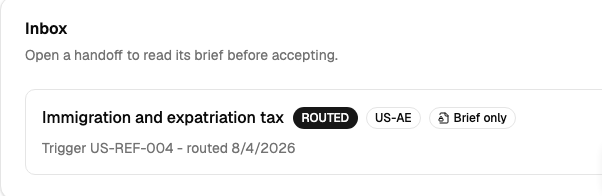
- Counsel category: which practice area the trigger asked for.
- Status:
ROUTED(waiting on you),ACCEPTED,DECLINED,WITHDRAWN(the owner pulled it),CLOSED. - Corridor badges: the cross-border corridors in the file.
- Brief only: shown while the owner has released no vault data for this handoff.
- Trigger line: the rule identifier that raised the referral, and the routing date.
An empty inbox means nothing has matched your profile yet, not that the network is quiet.
The Cross-Border Corridor Brief
Click any card to open the brief in a side panel. Read it before you respond.
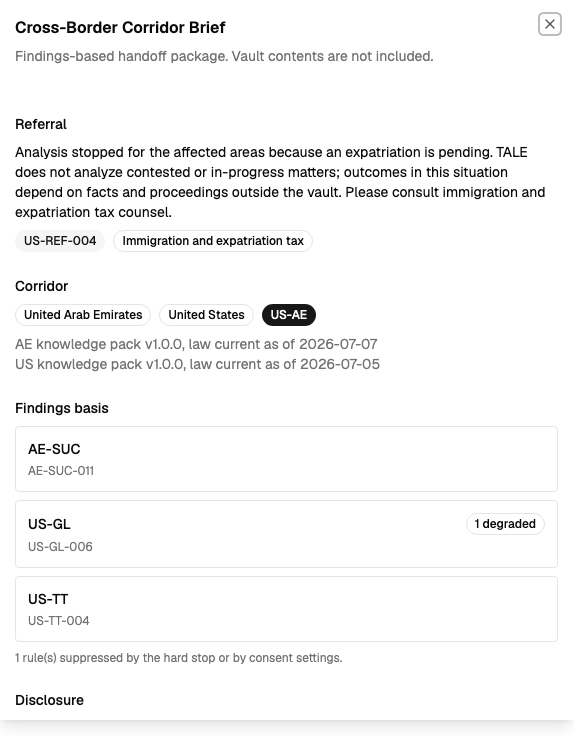
| Section | What you get |
|---|---|
| Referral | The plain-language reason this came to you, the trigger rule identifier, and the counsel category. |
| Corridor | Jurisdiction and corridor badges, plus each knowledge pack with its version and the date its law is current as of. |
| Findings basis | Findings grouped by family, with the rule identifiers behind each and a degraded count where the engine had incomplete inputs. Below it, how many rules were suppressed by the hard stop or by the client's consent settings. |
| Disclosure | The disclosure note, any consent buckets the client withheld (Governing-law anchors, Family map, Intent and wishes, Sensitive details), the current vault release state, and provenance. |
What the brief is not
The brief carries rule identifiers, pack versions, and consent booleans. It never carries vault contents. A brief that fails its format check is refused rather than shown, with "This brief failed its format check and was not served. Contact BlockWill support."
Opening a brief is recorded in the audit trail against your account.
Accepting or declining
The response controls appear at the bottom of the panel only while the status is ROUTED.
Read the brief in full, especially Disclosure, so you know what has been withheld before you commit.
To take the matter, click Accept. The status moves to ACCEPTED.
To pass, type a short reason (up to 500 characters) and click Decline. The reason box is ignored on accept, so it is only ever sent when you decline.
Either way the panel closes and the card updates. You cannot respond twice: a second attempt is refused with "No routed handoff found to respond to".
Getting the client's data
Accepting a handoff does not unlock anything.
- While the card shows Brief only, you have findings and nothing else.
- The owner grants a release per handoff. It is not a blanket consent for your firm.
- A granted release can be revoked at any moment, and withdrawing the handoff revokes it automatically.
- To ask for specific documents or fields, go through BlockWill. The owner decides each release.
There is no direct messaging between you and the client in the portal. Requests for material route through BlockWill.